


Many businesses hire a virtual assistant because they feel overwhelmed. The inbox is full, tasks keep piling up, and there never seems to be enough time to focus on growth. So hiring help feels like the logical solution.
But surprisingly, many owners feel busier after hiring a VA.
They spend more time answering questions, fixing mistakes, and checking work than they did before. At that point, they start thinking the assistant isn’t capable enough.
In most cases, the problem isn’t the person.
It’s the lack of clear processes.
A virtual assistant doesn’t automatically organise your business. They simply operate inside whatever system you already have. If the system is unclear, the confusion multiplies.
What actually happens when you hire a VA without SOPs
The expectation gap
Inside your head, your business feels organised. You know how things should look, how clients should be handled, and what quality means.
The issue is that none of that knowledge exists outside your mind.
You might assign a task like uploading products to a website. To you, that includes formatting, categories, naming style, image order, and maybe even SEO tags. To the assistant, it simply means uploading the items.
The work gets completed, but not in the way you expected. So you explain again. Then again the next day. Then again the following week.
Eventually, you realise you are teaching the same thing repeatedly. Not because the VA cannot learn, but because the instructions were never clearly documented.
Productivity goes down instead of up
Without clear guidance, work turns into a constant back-and-forth conversation. The assistant keeps asking where to save files, which tasks matter first, or what format to use. None of these questions are unreasonable, but answering them all day removes the benefit of hiring help.
You then start reviewing every detail. Small corrections become routine. Delegation slowly turns into supervision.
Instead of removing tasks from your schedule, you’ve added a management layer you never planned for.
The hidden cost most businesses miss
People often evaluate a virtual assistant based on salary cost alone. However, the real cost appears in lost time and operational friction.
If you spend around 40 minutes daily correcting work or clarifying instructions, that becomes roughly 15 hours each month. Over a year, that equals several weeks of productive time lost.
Then come the indirect costs: slower delivery, frustrated customers, delayed decisions, and personal burnout. The VA didn’t create the expense, unclear processes did.
Why SOPs matter more than the assistant’s skill level
When things go wrong, many businesses replace the assistant and hire someone more experienced. The same issues usually return within weeks.
This happens because skill cannot replace clarity. Even a talented professional cannot follow instructions that do not exist.
Remote work makes assumptions risky
In an office environment, employees observe how work is done. They watch behaviour, notice patterns, and quickly ask small questions. Remote teams do not have that advantage.
Every unclear instruction becomes a delay or a guess. Distance turns minor uncertainties into repeated mistakes.
Good assistants fail in unclear systems
A capable assistant still cannot predict your preferences, priorities, or decisions. Without guidance, they hesitate. When someone hesitates, productivity drops and confidence declines.
SOPs remove that hesitation. They provide a reliable reference point so the assistant can act without waiting for approval every time.
Processes create consistency
When workflows are documented, onboarding becomes faster and results become predictable. Instead of relying on memory or repeated explanations, the assistant follows a defined method.
The goal of documentation is not rigidity. It is stability. Once stability exists, improvement becomes possible.
The five things you should document before hiring a VA
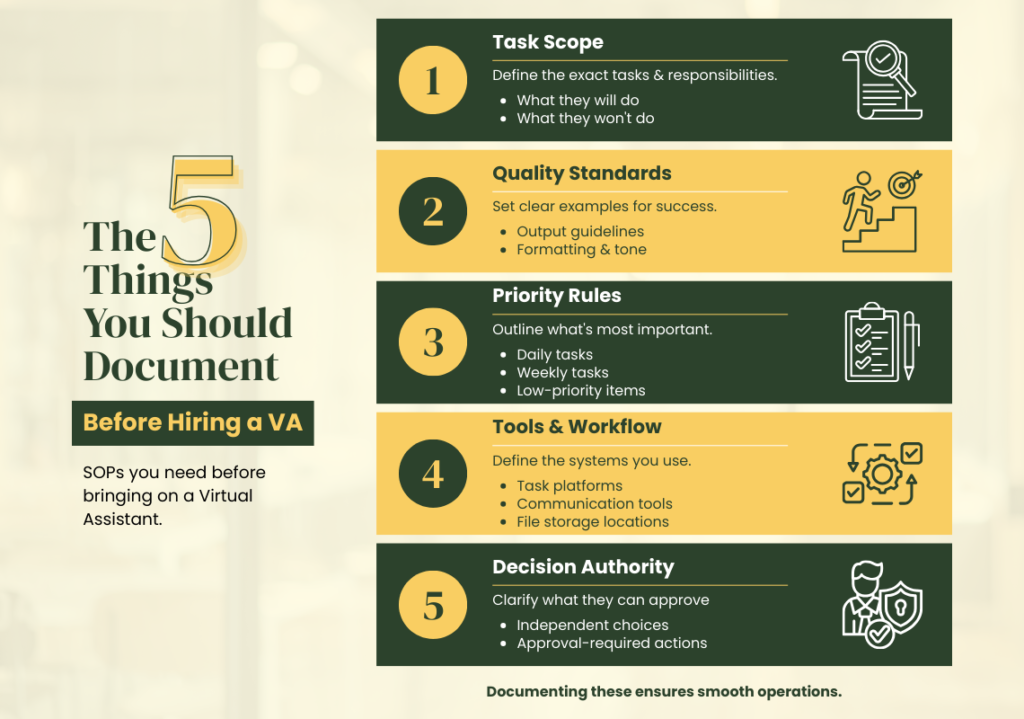
Many articles advise creating SOPs but rarely explain what should actually be written. These five areas form the foundation.
1. Task scope
Define exactly what the role includes. Rather than saying “assist with marketing,” list the specific activities such as scheduling posts, updating content, preparing reports, or organising leads.
Also clarify what the assistant should not handle. Boundaries prevent misunderstandings and protect decision-making areas.
2. Quality standards
Most conflicts occur because “done” means different things to different people. Provide examples of acceptable output, formatting rules, naming conventions, or tone guidelines.
People perform better when they can see the target instead of guessing it.
3. Priority rules
Not all tasks are urgent. If the assistant cannot distinguish priority, they will constantly interrupt for confirmation.
Define daily responsibilities, weekly responsibilities, and low-priority items. Once priorities are clear, independent work becomes possible.
4. Tools and workflow
Specify where tasks are assigned, where communication happens, and where final files are stored. Without this clarity, work gets scattered across platforms and becomes difficult to track.
5. Decision authority
Explain which decisions the assistant can make independently and which require approval. This prevents both over-stepping and excessive hesitation.
What a practical SOP looks like
An effective SOP does not need to be long or complicated. Simplicity works best. A short document or screen recording can often replace lengthy manuals.
A useful structure includes:
- purpose of the task
- when it should be performed
- step-by-step actions
- example of correct output
- common mistakes
- checklist for completion
The aim is not paperwork. The aim is clarity.
Comparing results: with and without SOPs
When processes are unclear, onboarding takes longer, mistakes are frequent, and supervision is constant. Confidence stays low on both sides.
With clear documentation, onboarding becomes smoother, errors reduce, and the assistant starts working independently. Owners spend less time managing and more time improving the business.
The difference is rarely talent, it is structure.
When businesses usually realise the issue
Most owners recognise the problem only after repeated frustration. It often appears after the second failed hire, missed deadlines, or growing client complaints. Some conclude that remote staff simply do not work for them.
In reality, the remote setup wasn’t the obstacle. The absence of a defined workflow was.
A simple readiness checklist before hiring
Before bringing a virtual assistant into your business, make sure a few basics exist:
- a clear outcome for the role
- repeating tasks identified
- basic workflow described
- communication channel chosen
- review routine planned
If these are missing, preparation should come first. Hiring too early often leads to disappointment.
The role of a good hiring partner
There is a difference between providing a worker and supporting a working relationship. A good partner helps define responsibilities, suggest delegation structure, and guide onboarding so collaboration lasts long-term.
The goal is not just filling a position. It is building a productive workflow where both sides know what success looks like.
Final thoughts
A virtual assistant is not a magician who fixes disorganisation. They are a multiplier of whatever system already exists. When the process is clear, hiring creates freedom and scalability. When the process is unclear, it creates more confusion.
The order matters: prepare first, document second, hire third, then scale.
Before you bring someone into your business, give them a map. Otherwise you are not delegating work, you are delegating uncertainty.